Why your office chair hurts, by where it hurts
Six locations, six different causes, and most of them are a setting rather than a chair. Find your spot, fix the setting, and only then consider spending money.
By Sawyer V. · Published October 10, 2026
We earn a commission if you buy through the links on this page, at no extra cost to you. It does not affect the order of the picks - the rubric does that, and here is how we are funded. Prices were last verified October 11, 2026.
What we did and did not do
Units we claim to have tested: 0. Everyone in this category says they tested twenty chairs. We have not sat in any of these, and we say so.
What we did instead: compiled every figure each manufacturer publishes, computed the fit ranges from a cited anthropometric table, and linked the source for each number so you can check the arithmetic. Where a manufacturer does not publish a figure, we say that rather than filling the gap. The full method, including what we cannot assess, is here.

Before you buy anything: the most common cause of chair pain is a seat height that is correct for your desk and wrong for your legs, and the fix costs thirty dollars. If your forearms are level with the desk and your feet dangle, your thighs are carrying your legs' weight all day. A footrest fixes it. Lowering the chair instead trades a leg problem for a shoulder problem, which is the mistake almost everyone makes.
Second: a new chair that hurts is usually a chair set up wrong, not a bad chair. Everything below is a setting first and a purchase second, and three of the six locations have a free fix.
The useful move is to diagnose by where it hurts, because the locations point at different settings. Here is the table.
Find where it hurts
| Where it hurts | Most likely mechanical cause | Try this first | If you must buy |
|---|---|---|---|
| Lower back | Lumbar support sitting above your curve, or a seat so deep you are perched off the backrest entirely | Find the hollow just above your pelvis - roughly belt height. Lower the support to it, or strap a cushion there | A chair with published lumbar travel (4 of 38 publish it), or a $23 cushion |
| Back of the thighs / behind the knee | Seat too deep. The front edge is pressing where OSHA says it must not | Sit back fully: you want 2-3 fingers between the seat edge and the back of your knee. If you cannot, the pan is too long | A chair whose published seat depth is under your buttock-popliteal length minus 2 in |
| Feet, calves, dangling legs | Seat too high for your legs - correct for the desk, wrong for you | Nothing free. Do NOT lower the chair | A footrest. Platform heights in our set run 3.25 to 19.3 in |
| Hips, outer thighs | Seat too narrow, or armrests set so wide your legs are clamped between the pan edges | Widen or drop the armrests. Check whether you are sitting between the seat bolsters rather than on the pan | A chair with a published seat width (13 of 38 publish it) |
| Tailbone | Weight on the coccyx rather than the sit bones, usually from a flat hard pan or a slumped pelvis | Sit tall so your pelvis rotates forward and the load moves to your sit bones | A cushion with a published rear cutout - one in our set publishes 4.7 in thickness with one |
| Neck, shoulders, upper back | Armrests at the wrong height, lifting your shoulder into a shrug, or a screen below eye level | Set the seat first, then bring the armrests UP to your elbows. Then raise the screen | A chair with counted armrest axes, or a $48 clamp-on headrest |
Set it in this order, because every step depends on the one before
- Seat height, from the desk. Raise the chair until your forearms are level with the desk surface and your elbows sit at roughly 90 to 120 degrees, which is what OSHA's working-position guidance asks for. This sets everything downstream.
- Feet. Now look down. If they are not flat on the floor with the back of your knee slightly higher than the seat - OSHA's exact criterion - put them on something. Do not lower the chair.
- Seat depth. Sit back fully. Two to three fingers should fit between the front edge and the back of your knee. If the chair has a sliding pan, use it; one chair out of 38 does.
- Lumbar support. Run a hand down your spine to the inward hollow just above your pelvis. The firmest contact should land there. Above it and the chair is shoving your mid-back forward.
- Armrests, last. Bring them up to where your elbows already are, with your upper arms hanging. If the armrest is doing the lifting, it is too high.
- Then the screen, not the chair. If your monitor is below eye level you will flex your neck forward all day and no chair setting fixes a geometry problem somewhere else.
Change one thing at a time and give it a day. If you adjust five settings at once and it feels better, you have learned nothing about which one mattered - and you will not be able to get back if it feels worse.
A new chair that hurts
Three separate things get confused here and they have different answers.
A genuine adjustment period. If you have moved from a slumped soft chair to a supportive one, muscles that were not working are now working. That is real, it is usually a few days to a week, and it feels like ache rather than sharpness.
A chair set up wrong. Far more common, and it does not settle - it just gets worse by Friday. Everything above applies.
A chair that does not fit you and never will. Seat depth is the usual culprit because it is fixed on nearly every chair under $300. If the pan is three inches too long for your femur, there is no adjustment and no adaptation; return it. Sharp pain, numbness, tingling or pins and needles is never an adjustment period - that is a stop-and-reassess signal, not something to push through.
When the answer is not a chair at all
- Your desk is the problem. A standard 29 in desk is set for a user around 5 ft 10 in. Anyone shorter is choosing between correct elbows and correct feet - which is why the footrest is the highest-leverage cheap purchase in this whole category.
- Your screen is the problem for most neck pain. We cover seating and nothing else, so that is as far as we can take you.
- You are not moving. OSHA's guidance is explicit that no single posture should be held indefinitely, and recommends standing and walking periodically and alternating tasks. The best-set-up chair in the world held still for eight hours is still eight hours held still. That is the argument for a second, different seat rather than a better single one.
Where this page stops
Everything above describes mechanics: which published dimension or adjustment controls which contact point. It is not medical advice, there is no clinician on this site, and nothing here is medically reviewed. We do not know what is causing your symptoms.
Pain that is severe, worsening, radiating into a limb, or accompanied by numbness, tingling, weakness or any change in bladder or bowel function is a reason to see a clinician promptly - not a reason to buy a chair or keep adjusting one. If you have a diagnosed condition, our by-condition pages state the published figure each one turns on, but the direction that suits you is a question for whoever is treating you: lower-back pain, sciatica, spinal stenosis, a herniated disc, neck and shoulder pain.
The three fixes that cover most of the table
Ranked on the published rubric. Tap a row for the full write-up; the price button goes straight to Amazon. Every figure in the write-ups is the manufacturer's own published specification, linked at the source. We have not sat in any of these.
| # | Product | Best for | Score | Price |
|---|---|---|---|---|
| 1 | 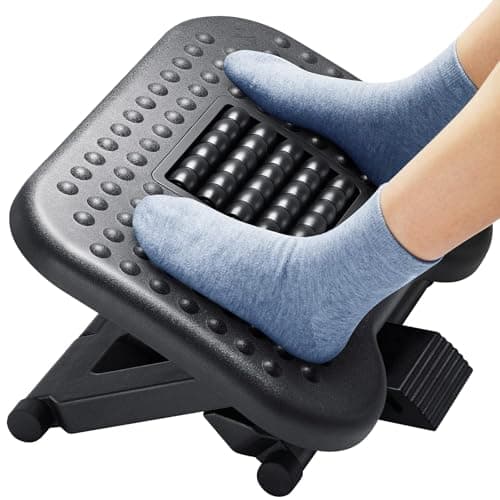 HUANUO Adjustable Footrest Fixes the Most Common Cause | Feet that do not reach the floor | 9.2 | $29.99 - View on Amazon #ad disclosure · October 11, 2026 |
| 2 | 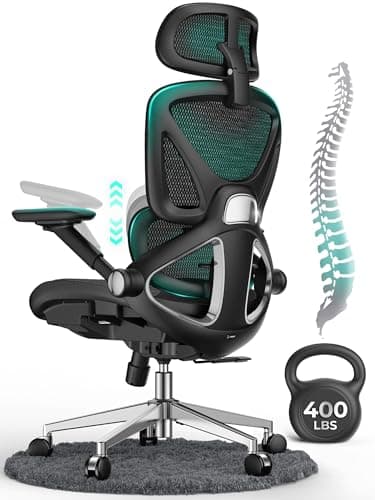 CAPOT Ergonomic Mesh Chair Best If the Chair Is Genuinely Wrong | 2 in of lumbar travel, 8 levels | 9.8 | $199.99 - View on Amazon #ad disclosure · October 11, 2026 |
| 3 | 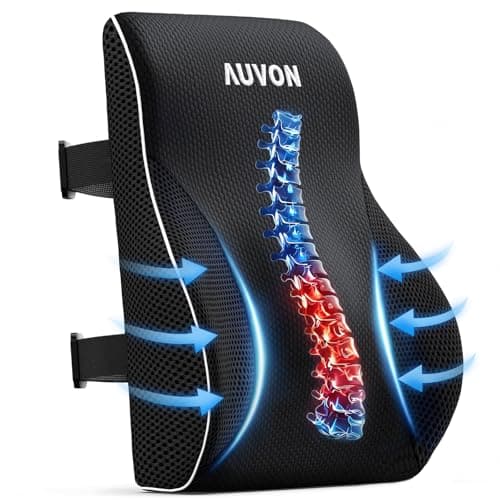 AUVON Lumbar Pillow with Bulge Cheapest Real Fix | A bump in the wrong place | 7.4 | $22.79 - View on Amazon #ad disclosure · October 11, 2026 |
01 · Fixes the Most Common Cause
HUANUO Adjustable Footrest
9.2/10 · scored on the published rubric
Three published heights and a 30 degree tilt range - the most adjustment of any footrest here, and the reason it is the pick for a chair you cannot lower far enough.
Why you might not: The three heights are fixed positions, not a continuous range, so if your gap is 4.6 in you are choosing between too low and too high.
| Platform height | 3.9-6.5 in |
|---|---|
| Footprint | 17.3 x 13.1 in |
Adjustments published (2): three platform heights: 3.9, 5.3 and 6.5 in; tilt 0-30 degrees.
Not published by the manufacturer: rated capacity; warranty term. We have flagged these rather than guessed.
How this score was built
- Fit range9/10
- Adjustability9/10
- Size & footprint9/10
- Materials & warranty10/10
- Spec coverage9/10
The overall is the mean of these, rounded to one decimal place. Each criterion is computed from a published figure - the rubric is here.
02 · Best If the Chair Is Genuinely Wrong
CAPOT Ergonomic Mesh Chair
9.8/10 · scored on the published rubric
The only chair on this site that answers all six rubric criteria from published figures: seat range, depth, width, 400 lb capacity, a five-year warranty and eight levels of 2 in lumbar travel. At $199.99 that is $40 per warranty year.
Why you might not: It tops out at 22.05 in. If you are over about 6 ft 2 in you will run out of seat height, whatever the listing's stated window says.
| Seat height | 18.5-22.05 in |
|---|---|
| Seat depth | 19.3 in |
| Seat width | 20 in |
| Rated capacity | 400 lb |
| Warranty | 5 years |
| Cost per warranty year | $40.00 |
| Maker's stated user height | 5 ft 5 in to 6 ft 2 in |
Adjustments published (5): seat height (18.5-22.05 in); lumbar depth (2 in over 8 levels); backrest lock at 90, 110 and 125 degrees; headrest height and depth; armrests flip up 90 degrees.
How this score was built
- Fit range9/10
- Adjustability10/10
- Capacity headroom10/10
- Materials & warranty10/10
- Spec coverage10/10
The overall is the mean of these, rounded to one decimal place. Each criterion is computed from a published figure - the rubric is here.
Price as of October 11, 2026. #ad how this is funded
03 · Cheapest Real Fix
AUVON Lumbar Pillow with Bulge
7.4/10 · scored on the published rubric
The only lumbar cushion here that publishes its thickest point - 4.5 in - and the user-weight band it was designed for, 100 to 200 lb. That is the figure to compare against your chair's own lumbar depth.
Why you might not: That 100-200 lb window is narrow and published for a reason: above it, the foam compresses further than intended.
| Thickness | 4.5 in |
|---|---|
| Footprint | 18 x 15 in |
| Rated capacity | 200 lb |
Adjustments published (1): adjustable straps.
Not published by the manufacturer: foam density; warranty term. We have flagged these rather than guessed.
How this score was built
- Fit range8/10
- Adjustability7/10
- Size & footprint8/10
- Materials & warranty6/10
- Spec coverage8/10
The overall is the mean of these, rounded to one decimal place. Each criterion is computed from a published figure - the rubric is here.
Questions people actually ask
Why does my office chair hurt my lower back?
Why does my office chair hurt the back of my legs?
Why does my office chair hurt my hips?
Why does my office chair hurt my tailbone?
Why does my new office chair hurt my back?
Should I lower my chair if my feet do not reach the floor?
Can a bad office chair cause back pain?
Read next
Sources
Every figure on this page traces to one of these. Product specifications come from the manufacturer's own listing; prices come from a live lookup and carry the date they were verified.
- OSHA eTool, Computer Workstations - Chairs
- OSHA eTool, Computer Workstations - Good Working Positions
- Pheasant & Haslegrave, Bodyspace: Anthropometry, Ergonomics and the Design of Work - percentile table as tabulated by RoyMech
- ANSI/BIFMA X5.1, General Purpose Office Chairs - test summary (Micom Laboratories)